
Manual hand-offs are often the real bottleneck, not a lack of effort. Enterprise workflow automation software in Australia helps organisations route routine work, move information between steps and manage approvals with less manual follow-up. It is useful for repeatable processes where delays, duplicated effort or unclear ownership disrupt operations.
The frustration is familiar: requests sit in inboxes, staff enter the same details more than once, and teams struggle to see where work stands. Digitising a process alone does not fix it. Workflows still need clear ownership, sensible rules and a defined way to handle exceptions.
This article explains what workflow automation software does and how it can support document-heavy operations in insurance, financial services, wealth management, health and utilities. It covers business use cases, platform selection and implementation, with a focus on operational needs. Use it to identify what to improve and assess which software fits.
Key Takeaways
- Map the steps, hand-offs and rekeying in a process before deciding what to automate.
- Prioritise repeatable workflows where delays, manual data entry or unclear ownership create operational friction.
- Automation applies across document-heavy work in finance, health, HR and customer operations, not just accounts payable.
- Choose software by how well it fits your systems, approval paths, governance needs and plans for ongoing workflow improvement.
- CoTé’s Virsaic Enterprise is a relevant option for organisations seeking to automate document composition, workflow approvals and communications.
Choosing processes to automate by hours saved and implementation effort
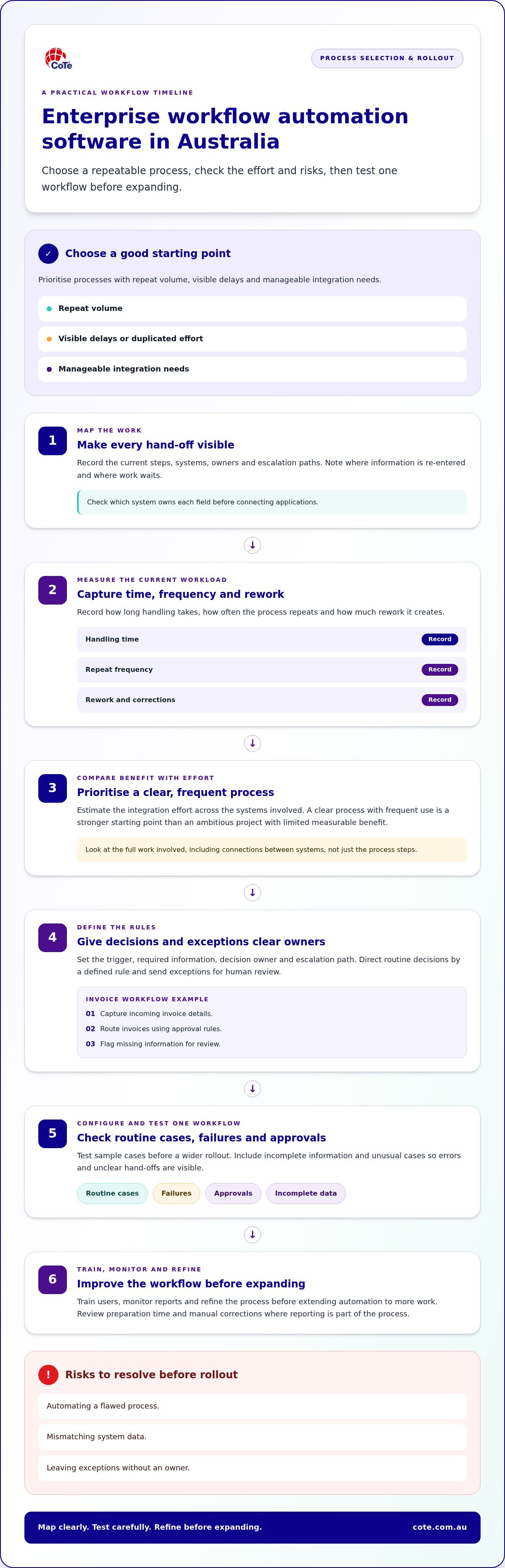
Prioritise processes with repeat volume, visible delays and manageable integration needs. Common risks include automating a flawed process, mismatching system data and leaving exceptions without an owner. Map the current steps and escalation paths before implementation.
Hours saved and implementation effort
Compare the time a process consumes with the work required to automate it. Record current handling time, repeat frequency and rework, then estimate integration effort across the systems involved. Prioritise a clear, frequent process over an ambitious project with limited measurable benefit.
Invoice, approval and reporting workflows
Invoice processing offers a practical starting point: capture incoming details, route invoices by approval rules, and flag missing information for review. For approvals, define who acts at each stage and what happens when a request needs correction. Reporting is another candidate. Track preparation time and manual corrections before and after implementation.
Document-intensive process automation
Business process automation works beyond accounts payable. In insurance, a document-heavy claim workflow could route submitted documents for review, request missing information and pass an approved file to the next team. Enterprise system integration connects the applications involved, reducing repeated entry. Start by listing each data hand-off and checking which system owns each field.
Standardised tasks and process rules
Process rules make repeated decisions more consistent. A rule could direct an approval request to the appropriate role based on its type, then send exceptions for human review. Define the trigger, required information, decision owner and escalation path before configuring the workflow. Enterprise teams considering connectors should assess data handling, permissions and integration limits against their governance requirements.
What is workflow automation software?
Workflow automation software moves routine business processes through defined steps, such as assigning a sales lead or preparing a report. In Australia, assess security, privacy and data residency against the information handled and your organisation’s obligations. Consider access controls, retention and where data is stored or processed.
Automation across healthcare, HR, sales and finance
Use cases vary by team, but the practical test is the same: identify a repeated task, its inputs and its next owner. In healthcare, a referral workflow could route documents to the right review queue. HR teams could standardise candidate onboarding, while finance teams could transfer approved transaction details into reports.
Sales operations can automate pipeline updates when a lead changes stage. Job costing workflows can collect project expenses against the correct job and prepare the information for review. Sales order automation can pass order details between teams, reducing repeated entry. Define the business rules first, including which exceptions need staff attention.
Marketing and sales automation can coordinate communications with pipeline activity. For example, a completed enquiry form could create a lead record and trigger an assigned follow-up task. Reports can then show where enquiries stand and which steps remain open. Ensure every automated action uses accurate customer information and has a clear owner.
Lead assignment and support ticket routing
Lead assignment routes new enquiries using rules such as product type, region or team responsibility. Set assignment rules, define an exception queue, then review reports for unassigned or duplicated records.
Support ticket routing follows the same logic. Requests about a claim, account or service interruption can go to the relevant queue based on category and urgency. Use clear status and hand-off language so staff know what each step means. Test sample requests, including incomplete submissions, before applying the rules across operations.
Choosing workflow automation software
Choose a platform that fits your systems, process rules and governance needs, and test it against a real workflow rather than a feature list. Start with how well each option fits your operating environment.
Assessing enterprise workflow automation software in Australia
Platform pricing depends on the requirements and is provided after a quote request. Cost drivers include workflow complexity, integration needs, data volume, licensing and ongoing support. Compare the full operating cost, not just implementation. Ask how changes, maintenance and support are managed after launch, and align those arrangements with your internal team’s responsibilities.
Check how the platform handles routine work, exceptions and audit records. A simple trigger, such as receiving an approved form, should lead to a clear next action. Test incomplete data and unusual cases to expose errors before a wider rollout. Assess how the platform fits your governance requirements.
Local vendors and implementation partners
For Australian delivery, consider Australian-built platforms and implementation partners with local teams. Assess their experience connecting existing systems, supporting required data-handling arrangements and documenting handovers. Confirm who owns configuration, issue resolution and future changes. Local support can help teams coordinate decisions across business hours and operational locations. CoTé’s software is Australian-built and hosted on Microsoft Azure in Australia and the United States. CoTé is ISO/IEC 27001 certified and has a SOC 2 Type II report.
Implement in stages:
- Map the current process, systems and owners.
- Set the desired outcome, permissions and exception rules.
- Configure one workflow and test routine cases, failures and approvals.
- Train users, monitor reports and refine the process before expanding.
For an enterprise, the right fit supports required controls and integrations without adding avoidable complexity. It should also give teams a practical path from pilot to wider use.
CoTé: Virsaic Enterprise
Virsaic Enterprise is CoTé’s enterprise Customer Experience Management platform. It supports document composition, workflow approvals, signatures and multi-channel communications. It is designed for organisations managing document-heavy processes across insurance, finance, health and utilities.
Consider Virsaic Enterprise when approval chains, document creation or customer communications involve repeated manual steps. Pulse supports email and SMS campaign workflows, while Virsaic Enterprise supports document and approval processes.
Take the next step with a defined workflow
Start with a process owner, a clear starting point and an agreed definition of success. This gives your team a practical basis for assessing workflow automation software, rather than choosing tools around a broad transformation goal. Keep the initial scope contained, document how exceptions are handled and assign responsibility for resolving them.
CoTé offers Virsaic Enterprise, Zign and Pulse. Match the product to the task: document and approval processes, electronic signatures, or email and SMS campaigns.
Ready to automate your first workflow? Request a Virsaic Enterprise platform demo.
Frequently Asked Questions
What security, privacy and data residency requirements apply to workflow automation software in Australia?
Assess security, privacy and data residency against the information handled and your organisation’s obligations. Review access controls, retention, where data is stored or processed, permissions and data-handling arrangements.
How does workflow automation software support compliance with Australian regulations and industry standards?
Assess governance requirements, access controls, permissions, audit records, data retention and where information is stored or processed. Define process owners and exception paths, and ensure personnel roles align with regulatory requirements.
Which processes should we automate first?
Start with a repeatable process that has a clear owner, steady volume and visible friction, such as approvals that stall in inboxes or details entered more than once. Record current handling time and rework before making changes. A contained first workflow lets the team test rules and exceptions before expanding to more complex processes.
Does workflow automation replace existing systems?
Not necessarily. Automation often connects the systems an organisation already uses, moving information between steps and reducing repeated entry. Identify which system owns each piece of information, then decide what needs to connect. Replace a tool only when there is a clear operational reason, not because a new platform is available.
How do you measure whether workflow automation is working?
Set a baseline before changing the process. Track completion time, rework, overdue steps and exceptions that need manual handling. Compare the same measures after the workflow has been in use for a suitable period. Treat the results as evidence for refining the process, and don’t claim an improvement until the data supports it.
Disclaimer
This article provides general information only and does not constitute legal, compliance or professional advice. Consider your organisation's specific obligations and seek appropriate advice before making decisions.