
Approval delays are rarely just a software problem. They often point to unclear decision rights. If you’re working out how to manage document approval workflows, start by defining who owns each stage, what counts as approval and which version is under review. Without those basics, another notification system can move confusion around faster.
A document sitting in an inbox with no next action isn’t a process. Neither is feedback scattered across copies or a final decision nobody can explain later. These are signs that roles, decision rules and recordkeeping need to be clearer.
This guide shows you how to build a repeatable approval process that keeps work moving without losing control. You’ll learn how to set stages and approvers, choose sequential or parallel reviews, manage revisions, reduce manual chasing and preserve a clear history of decisions. Establish accountability and document control first, then use workflow software to route work consistently. The result is a clearer record of what was reviewed, by whom and why, with fewer avoidable delays.
Key Takeaways
- Learn how to manage document approval workflows by defining clear roles, stages and decision rules before adding automation.
- Map each document’s path from request to release, with one process owner accountable for keeping it on track.
- Choose sequential, parallel or conditional routing based on how each decision needs to be made.
- Set practical response expectations and escalation steps so overdue approvals don’t disappear into inboxes.
- Assess whether approval software fits your document composition, review history, signature and business system needs.
Why document approval workflows break down, and what a managed process changes
A document approval workflow is the controlled path a document follows from submission to a recorded decision. It sets out who handles the document, what happens at each stage and how the outcome is captured.
Review examines and comments on a document; approval records an authorised decision to accept or reject it; release makes the approved version available for use. Keep those steps distinct. Editorial feedback can improve wording, but it doesn’t necessarily give someone authority to approve a policy, contract or customer letter.
When no one owns the next action, requests sit in inboxes. Staff chase reviewers, edits arrive in separate copies, and nobody can confidently identify the current version. A managed process assigns responsibility and makes status visible, giving teams a clearer basis for acting on decisions. Weak records make it harder to explain what was approved, by whom and against which version.
Which documents need formal approval?
Start with documents where an error, unclear commitment or unauthorised change could affect customers, staff, finances or business operations. Examples include policies, contracts, customer letters and financial documents. Match the level of control to the document’s risk, audience and business impact, not simply its file type.
Separate input from authority. A subject-matter expert may review accuracy, while a designated manager or role-holder makes the approval decision. Record who can approve, who can recommend changes and who releases the final version. Don’t mistake a reviewer’s comments for approval.
How to spot a workflow that needs fixing
Look for repeated follow-ups, decisions buried in email, unclear escalation paths and reviewers asking which copy to use. Check a sample of recent requests. Can someone identify the current version, the person responsible for the next step and the reason for the last decision without asking around? If not, the process depends on informal knowledge rather than reliable controls.
Set a baseline before changing the workflow. Use existing request records, email timestamps or tracking sheets to note:
- How long requests take from submission to decision, including where they tend to stall.
- How often documents return for rework, and whether the cause is missing information, conflicting edits or unclear decision rules.
- Which requests are overdue, who owns the next action and whether escalation happened.
Keep the measure simple and consistent. Look for patterns rather than building a polished dashboard. These records help you judge whether changes improve turnaround and reduce rework while preserving the decision trail. They’re a practical starting point for managing document approvals with control, rather than simply adding more follow-ups.
Design a document approval workflow: request to release
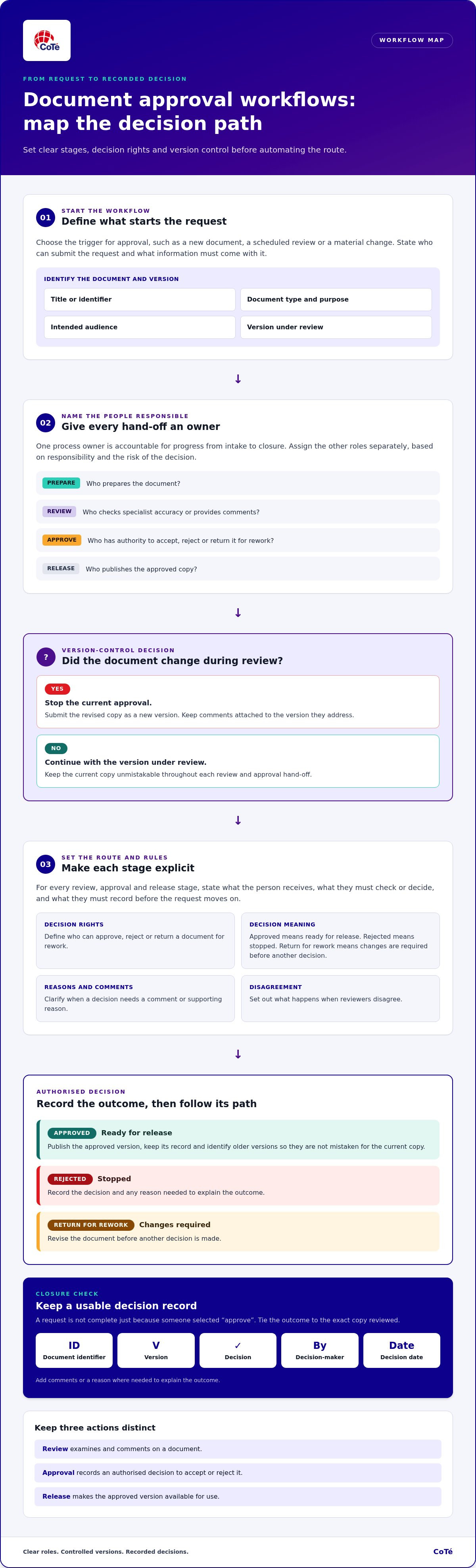
Design the route before you automate it. For each document type, map what starts the request, who owns it, which decisions are required and what proves the process is complete. Make every hand-off explicit, including the version being reviewed and the record each stage must leave behind.
- Define the trigger. State what starts approval, such as a new document, a scheduled review or a material change. Specify who can submit a request and what information must accompany it.
- Identify the document. Give it a clear title or identifier, document type, purpose and intended audience. Set the version under review before routing begins.
- Assign the owner. Name one process owner accountable for progress from intake to closure. Separately identify who prepares the document, provides specialist review, makes the authorised decision and releases the approved copy.
- Map the stages. Put each review, approval and release step in order. For every stage, state what the person receives, what they must decide or check, and what they must record before the request can move on.
- Set decision rules. Define who can approve, reject or return a document for rework, and what each outcome means. Clarify whether a decision requires a comment or supporting reason, and what happens when reviewers disagree.
- Define closure. Specify how the approved version is published, where its record is kept and how older versions are marked or removed from use. A request isn’t complete just because someone selected “approve”.
Set approval stages and decision rights
Keep editorial review separate from final authorisation and publication. A communications specialist might correct wording, while a designated decision-maker accepts or rejects the document. Assign these roles by responsibility and the risk of the decision, not by job title alone. Use plain outcomes: approved means ready for release; rejected means stopped; return for rework means changes are required before another decision.
Control versions, comments and hand-offs
Make the version under review unmistakable. If a document changes during review, stop the current approval and submit the revised copy as a new version. Keep comments attached to the version they address. The owner should resolve conflicting feedback into a clear revision rather than leaving reviewers to reconcile separate files. At release, mark the approved copy as current and identify superseded versions so they can’t be mistaken for the live document.
The minimum workflow record is the document identifier, version, decision, actor and date. Add comments or a reason where needed to explain the outcome. This record ties the decision to the exact copy reviewed and gives the next person a usable hand-off.
Once these rules are settled, software can support the process rather than dictate it. Virsaic Enterprise, CoTé’s enterprise Customer Experience Management platform, supports document composition, workflow approvals, signatures and multi-channel delivery. Explore Virsaic Enterprise for document workflows.
Sequential or parallel approvals: choose routing that fits the decision
Routing should follow the logic of the decision, not the organisation chart. Ask whether each reviewer needs the previous person’s findings or whether they can assess the same controlled version independently. That distinction determines whether approvals move in sequence, in parallel or through a conditional path. More approvers don’t automatically mean less risk. Each person should have a defined question to answer and authority that matches it.
| Routing | Best suited to | Trade-off |
|---|---|---|
| Sequential | A technical review that must inform an accountable manager’s decision. | Creates clear dependencies, but each hand-off can extend the wait. |
| Parallel | Independent assessments, such as separate operational and communications reviews. | Can gather input concurrently, but conflicting feedback needs an owner to reconcile it. |
| Conditional | Requests where a defined attribute changes the required reviewers or route. | Sends work to the relevant people, but unclear conditions can misroute requests. |
When sequential approval makes sense
Use sequential routing when the next decision depends on what came before. For example, a specialist may first assess a proposed technical change; an accountable manager then decides whether to authorise it in light of that advice. Make every hand-off explicit: name the next owner, state the expected action and show whether the request is waiting, under review or returned. Don’t add a stage that repeats an existing check without changing the decision.
When parallel or conditional routing fits
Parallel review works when people can assess the same version independently. Give each reviewer a clear remit and a shared response expectation, then send all feedback to one owner for reconciliation. Conditional routing is appropriate when a defined attribute, such as document category or a specified change, determines a different reviewer or path. Record the condition and resulting route so the decision can be understood later.
Set the conflict rule before launch. If parallel reviewers disagree, don’t let the workflow treat silence or the first response as consensus. The process owner should identify the issue, return it for clarification or refer it to the authorised decision-maker. Keep the original comments and the resolution attached to the version reviewed. This preserves useful dissent without leaving the outcome ambiguous.
Test every proposed approver: What decision are they responsible for? What expertise or authority do they bring? If the answer is unclear, their stage may add delay without adding control. A sound route makes decision rights visible and limits review to people whose input can affect the outcome. These rules give teams a practical foundation for handling more volume and complexity.
How to keep approvals moving without weakening control
Speed comes from clear expectations, not from skipping checks. Set a response window for each stage that reflects the document’s urgency and the work required. Tell approvers what action is required, and use reminders before a request becomes overdue. Name who owns escalation and what they can do, such as follow up, reassign an approval or refer a stalled decision to the process owner.
Workflow visibility shows where a request is; evidence shows whether an authorised person made a decision on the right version. Both matter. Keep an accessible history containing the decision, approver, date and time, comments and document version. A status label such as “complete” can help staff see progress, but it doesn’t explain who authorised release or what they reviewed.
Use that history to track completion time, overdue stages, rework and returned documents. Compare like with like, such as the same document type or stage over different periods. The aim isn’t to impose an arbitrary target. It’s to find where requests wait, what causes repeat work and whether changes improve the process without weakening decision controls.
Handle delays, rejections and changing requirements
Plan for an approver’s absence before it happens. Define who can reassign the task, what authority the replacement needs and how the hand-over is recorded. If a document is rejected or returned, require a clear reason and a practical resubmission path. For an urgent exception, record why the normal route changed, who authorised it, which version was used and what follow-up review is required. Urgency shouldn’t erase the trail.
Review workflow performance and governance
Have process owners review bottlenecks, repeated rework and requests that were abandoned or left open. Check whether delays reflect workload, unclear instructions, missing information or a stage that no longer adds value. Restrict workflow changes to authorised owners, and record significant updates, including what changed and when. This helps teams understand why a route looks different and which rules applied to a past decision.
Keep approval records according to the organisation’s applicable retention policies and obligations. Make the record accessible to people with a legitimate business need, while controlling who can change it. Review access and retention settings as part of governance. A well-designed workflow supports recordkeeping, but software alone doesn’t establish that an organisation has met every obligation.
When document approval software helps and how to use it
Software earns its place when it supports a process people understand. If staff still disagree about who can approve a document, what each stage means or which version is current, automation will make those gaps harder to manage at scale. First confirm that common document types follow repeatable approval paths, with known decision rights and a clear way to close each request.
Then look for work that consumes time without improving the decision: manual hand-offs, duplicate data entry, status checks and repeated requests for the same information. A useful evaluation asks whether software can reduce that friction while keeping the version, decision and approval history connected. It should support the process, not become the process.
Signs the process is ready to automate
Start with one contained workflow that has a clear owner and a manageable set of steps. Check that the team agrees on the route and knows what to do when a request is returned or an approver is unavailable. Set a baseline from current completion times, overdue stages and rework, then review the same measures after the workflow is in use. That gives you evidence of fit, not just a busy-looking dashboard.
Assess the software against the work your team actually does:
- Document composition: Does the process need to create documents from approved content or manage documents prepared elsewhere?
- Routing and review history: Can the intended workflow be represented, and can staff trace decisions to the version reviewed?
- Signatures: Is a signature step required, and how must its record connect to the approval history?
- Business systems: Where does information need to come from or go after approval, and what hand-offs still need to happen?
Connect approvals with document and customer processes
In document-heavy operations, approval is often one part of a longer chain. A document may need to be composed, reviewed, authorised and then used in customer communications. Consider whether connecting these activities could reduce re-entry and keep the approved content aligned with what is sent. Define the required hand-offs and records first; don’t assume a platform removes the need for governance or makes decisions on the organisation’s behalf.
Virsaic Enterprise supports document composition, workflow approvals and customer communications. CoTé’s software is Australian-built and hosted in Australia and the United States. CoTé is ISO/IEC 27001 certified and has a SOC 2 Type II report. When assessing a platform, consider how its workflow, hosting and data handling fit your organisation’s requirements alongside your governance needs.
For signature steps, CoTé’s Zign app provides eSignatures as part of the wider application suite.
Put one workflow into practice
Make the next step small and deliberate. Choose a document process with a clear owner, a repeatable route and enough activity to reveal where hand-offs still snag. Run it with the people who prepare, review, approve and release the document. Their feedback will show whether the rules work under real conditions, not just on a process map.
Use what you learn to refine the workflow before extending it to other document types. Keep decision rights and version controls intact as you automate routine movement. That’s a practical way to turn approval workflow guidance into an operating approach your team can maintain as needs change.
Ready to put your first approval workflow into practice? Request a Virsaic Enterprise platform demo.
Frequently Asked Questions
What is a document approval workflow?
A document approval workflow is a controlled process for moving a document from submission through review and authorised decision to release, while retaining a record of what happened. For example, a policy update might go from its drafter to a subject specialist, then an authorised approver, before the approved copy is made available to staff. The workflow clarifies each role and the decisions required at each stage.
How do you manage a document approval process with multiple approvers?
Start by defining each approver’s responsibility, then decide whether their input depends on someone else’s review. For a customer letter, one reviewer might check factual accuracy while another checks tone. Route those reviews in parallel only if both can assess the same version independently. To manage several decision-makers, assign one person to resolve conflicting feedback and keep everyone working from the same controlled copy.
Should document approvals happen sequentially or in parallel?
Use the dependency test: does one reviewer need another person’s findings or changes before making a decision? If yes, sequential routing makes the hand-off clear, though each stage can add waiting time. If reviewers can assess the same version independently, parallel routing may suit the task, but conflicting feedback needs resolution. Neither model is automatically better; choose the route that matches the decision and document the reason for it.
What should happen when a document approver is unavailable?
Use a defined reassignment path, not an informal substitution. The process owner should confirm who has authority to appoint a replacement and whether that person can make the same decision. Update the request so its status and new approver are visible to the requester and other reviewers. Record who reassigned it, when the change occurred and who completed the approval, so the hand-over is clear later.
How should teams handle a rejected document in an approval workflow?
A rejection should state what failed and what must happen next. The approver should leave actionable feedback, such as identifying a missing section or an unsupported claim, rather than a vague “not approved”. Assign the revision to a named owner, who can address the comments and submit a new version for review. Keep the rejected decision linked to the earlier version; don’t overwrite it with the resubmission.
What information should an approval audit trail contain?
An approval history should identify the document and version, the decision, the approver and the date and time of the action. Include relevant comments or reasons, particularly for rejection, rework or an exception to the usual path. For example, a later reviewer should be able to distinguish approval of version three from review of version two. Store the history where authorised staff can retrieve it without relying on personal inboxes.
When should a business automate its document approval workflow?
Automate once common document types follow stable, understood routes and staff can explain who decides what. Look for repeatable manual work, such as copying request details between systems, sending routine reminders or checking status by email. Start with a contained process, then assess whether the workflow handles normal requests and exceptions as intended. If roles or decision rules are still changing, settle those first; automation won’t resolve ambiguity on its own.
Disclaimer
This article provides general information only and does not constitute legal, compliance or professional advice. Consider your organisation's specific obligations and seek appropriate advice before making decisions.