Sending a text from an inbox is not the same as managing customer communications. Email-to-SMS software lets staff send text messages through an email interface, while CRM integration connects messaging to customer records and workflows. For organisations choosing email and SMS software for business, an integrated platform can bring channels and reporting into a broader operating setup.
That distinction matters when teams need oversight and a consistent view of customer interactions. A basic email-to-text service can suit a narrow task, but may not provide the customer context or cross-channel reporting a larger operation needs.
This guide compares email-to-SMS services, CRM-connected tools, cross-channel analytics and integrated platforms. It explains what each approach does, where it fits and what to assess, including integration, governance and day-to-day usability. The aim is to help you choose based on how your organisation communicates and manages records, not on the length of a feature list.
Key Takeaways
- Choose email and SMS based on the job each channel needs to do, not simply on the number of features in a platform.
- Build consent, unsubscribe handling and record-keeping into campaign workflows, with Australia’s Spam Act 2003 as a key reference point.
- Compare email-to-SMS services with CRM integrations to see how each handles customer context, automation and reporting.
- Use cross-channel analytics to understand how communications perform across touchpoints and where teams need a clearer view of customer activity.
- Explore Pulse for email and SMS marketing, and Virsaic Enterprise when communications form part of wider document and approval workflows.
Is email and SMS marketing still effective?
Yes, when each channel has a clear job. Email suits detailed information, while SMS puts short messages and alerts in front of customers quickly. Visibility alone doesn’t qualify a lead or prove a campaign worked. Track the response that matters, such as a completed form, booked appointment or reply from a prospect.
For sales teams, use a text to prompt a defined next step, not to replace a proper conversation. For example, a message can invite a prospect to choose a time for a call. Record the reply and qualification outcome in the customer record. That gives the team context before its next contact and helps distinguish an active lead from someone who needs no further sales follow-up.
Message length affects delivery format. A standard SMS segment is 160 characters, and longer texts split into multiple segments. Some credit-based services limit emoji-containing messages to 70 characters. Keep the core instruction near the start, then test how the message appears when divided. For appointment alerts or service updates, remove promotional copy that obscures the action.
Australia’s Spam Act 2003 sets out rules for sending commercial electronic messages, according to the Federal Register of Legislation. Australian businesses must remove a person from a marketing mailing list no later than 5 working days after an unsubscribe request, according to the Australian Communications and Media Authority. Treat consent, sender details and opt-outs as operational controls, not optional campaign settings. Branded SMS and MMS sender IDs must be registered on Australia’s SMS Sender ID Register .
Separate international and transactional messaging from domestic promotions. International delivery depends on the destination, carrier route and sender configuration. Transactional messages, such as account or service alerts, need clear triggers and relevant content. Before using an SMS platform across borders, review destination coverage, delivery reporting and sender identification. Keep sales messages distinct from operational notices so recipients understand why they received each one.
Pricing and credit plans differ. A subscription may bundle message credits, while a credit plan may charge by usage or destination. Compare how the platform counts message segments, handles international messages and treats unused credits. Don’t compare headline rates alone: the billing unit and route affect total spend.
| Option | Best-fit task | Key criterion |
|---|---|---|
| Detailed sales information | Response tracking | |
| SMS marketing | Short campaign prompts | Consent and opt-out controls |
| Email-to-SMS | Sending texts from an inbox | Sender identity and routing |
| Transactional SMS | Account or service alerts | Reliable trigger and delivery records |
| Integrated platform | Coordinated customer communications | Shared customer context |
Choose the option that matches the message purpose, customer-record needs, delivery route and reporting requirements.
Cross-channel analytics and customer data
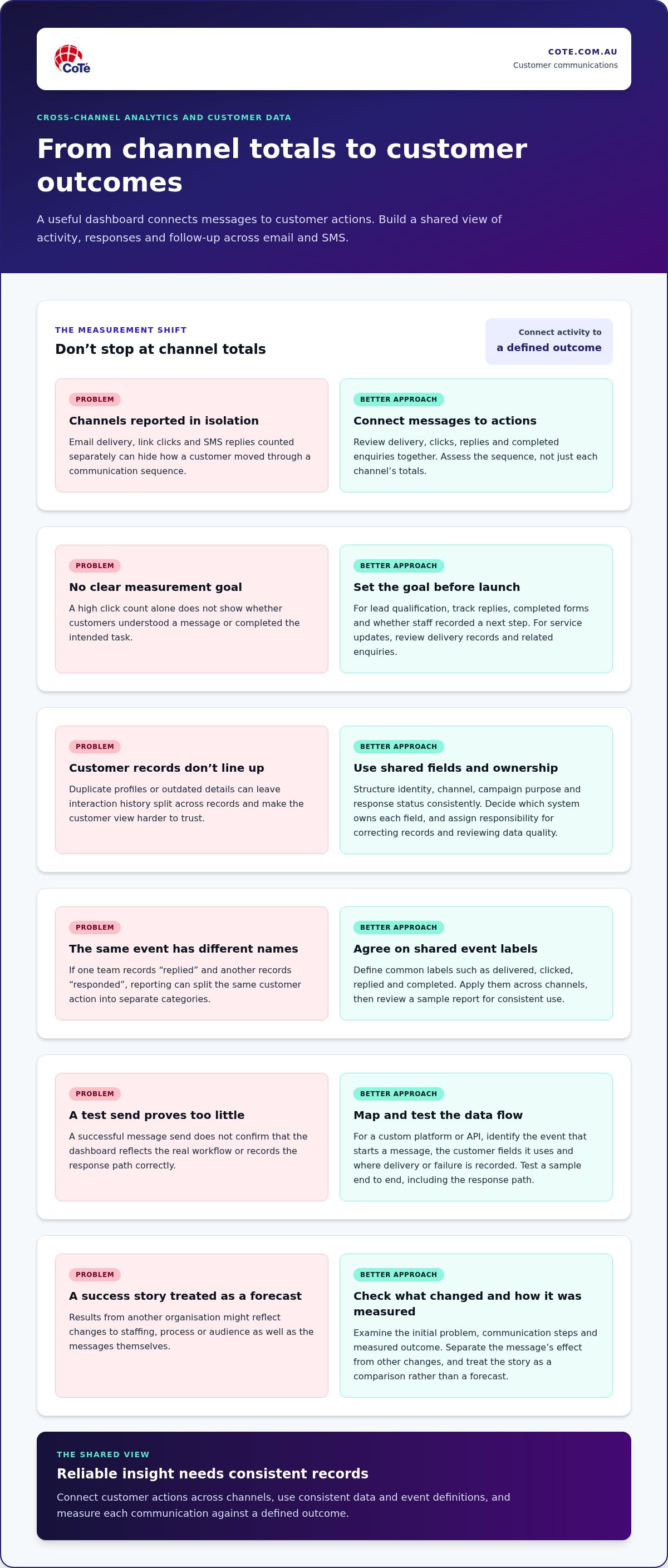
A useful dashboard connects each message to a customer action. Compare email delivery, link clicks, SMS replies and completed enquiries, then assess the sequence rather than each channel’s totals in isolation. For example, an email might explain a policy change while a follow-up text prompts a customer to update contact details. A shared record helps staff understand the interaction before responding.
Set the measurement goal before launching a campaign. For lead qualification, track replies, completed forms and whether staff recorded a next step. For a service update, review delivery records and related enquiries. Tie each measure to a defined outcome. A high click count alone does not show whether customers understood the message or completed the intended task.
Customer data needs a consistent structure. Use shared fields for identity, channel, campaign purpose and response status. Decide which system owns each field, then establish a process for resolving duplicate profiles and correcting outdated details. For example, if a customer appears under two email addresses, determine which record holds the current interaction history. Assign responsibility for reviewing data quality and dashboard definitions.
Analytics also depend on consistent event names. If one team records a response as “replied” and another as “responded”, reporting may split the same action into separate categories. Define shared labels for events such as delivered, clicked, replied and completed. Apply them across channels, then review a sample report to confirm every team uses each label consistently.
Assess customer success stories by examining the initial problem, communication steps and measured outcome. Separate the effect of the message from changes in staffing, process or audience. For example, a case about appointment reminders should explain how missed bookings were counted and what else changed during that period. Treat the story as a comparison, not a forecast for your organisation.
Measurement should include permission and opt-out records. Record when and how each customer gave consent, and when they unsubscribed, so reporting reflects who can still be contacted.
What is email-to-SMS software?
Email-to-SMS software lets staff send text messages through an email interface or connected system. Moving contacts and campaigns to a new platform requires field mapping, data cleaning and a controlled transition. Match records, retain relevant campaign settings and transfer contact preferences before switching workflows.
SMS automation and CRM integrations
SMS automation sends a text after a defined event, such as a completed application or service request. A customer relationship management system, or CRM, stores customer details and interactions—with cloud software such as minicrm.ro helping businesses manage contact records and processes in one place. Connecting the CRM to messaging lets workflows use record data to trigger relevant messages and log activity.
Unlike a basic email-to-text service, a CRM-linked workflow can use customer status to shape the next action. For example, an application status could determine whether someone receives an update or staff follow-up. Define the trigger, required fields and exception path before activating each campaign.
Coordinating email and SMS messages
Combining email and SMS means planning both channels as one customer journey. Give each channel a distinct purpose, such as using email for detailed instructions and SMS for a short prompt. Set contact rules across the journey so customers do not receive duplicate messages from separate campaigns.
To avoid over-messaging, suppress follow-ups after a customer completes the task or replies. Review the proposed sequence from the recipient’s perspective. Check the timing, message purpose and which team handles a response. This differs from sending through each channel independently, where campaign owners can lose sight of the full contact pattern.
Deliverability, reliability and data security
Assess email deliverability through delivery, bounce and complaint records. Review SMS delivery statuses by destination and examine failed numbers. These measures show different aspects of channel performance, so compare them with the workflow’s intended outcome rather than treating delivery as proof of engagement.
Assess technical reliability by tracing a sample message from trigger to recipient and reviewing its status record. For data security, examine access controls, data handling and incident processes against internal governance requirements. Assess support by reviewing its documented channels and escalation process. Together, these checks distinguish operational evidence from a feature list.
During migration, use a defined transition plan with an accountable owner for contacts, templates and workflow settings. Set a cutover point, then monitor the new system’s records for missing fields or unexpected results. This keeps migration oversight focused without duplicating tests across parallel processes.
SMS marketing software and CRM integration
When assessing email and SMS software for business, map the systems it must connect with. Australian ecommerce, CRM and accounting applications exchange data through native connectors, application programming interfaces (APIs) or middleware. The right option depends on your current systems and the workflow requirements. Where no direct connection fits, a controlled file transfer can handle simpler processes.
Integration means more than sending a text from a customer record. Systems need clear rules for matching people, updating fields and recording outcomes. For example, a CRM could provide a contact’s mobile number and preferred name, while the messaging platform returns delivery status and campaign response. Document who owns each field before enabling a live workflow.
For ecommerce, define which events start a message. An abandoned basket, order confirmation and delivery update each need different content. Keep promotional campaigns separate from service messages, and record customer actions against the correct profile. This helps teams distinguish sales activity from operational communication.
Booking and payment connections also need specific triggers. A booking system could start an appointment reminder, while a payment platform could initiate a transaction notice. Decide what happens when a booking changes or a payment remains incomplete. Test these cases with sample records to catch outdated reminders or irrelevant prompts.
CRM and accounting integrations need clear boundaries. A CRM can hold contact preferences and sales activity, while an accounting system can hold invoice status. Avoid copying every field into every platform. Transfer only the information needed for the message, and set access permissions around sensitive records. This makes data ownership easier to manage.
Integration methods suit different levels of technical complexity:
- Native connector: suits a supported system pair and a standard workflow.
- API: suits a tailored connection that exchanges defined data.
- Middleware: links applications through an intermediary when direct connections don’t fit.
- File transfer: suits a controlled exchange that includes staff review.
Before choosing a provider, trace a mobile customer journey from trigger to outcome. Check which system starts the message, how it identifies the recipient and where delivery results appear. Then test duplicate records, changed contact details and opt-outs. An advanced integration is useful when staff can explain its data flow and resolve common exceptions.
Email and SMS software for business should fit existing governance processes as well as technical needs. Document the systems involved, the data fields transferred and the teams responsible for each hand-off. This map gives project teams a practical basis for choosing a native connector, API or controlled alternative.
All-in-one email and SMS marketing platforms
There is no single best platform for every Australian organisation. Choose by assessing how email, SMS, customer records, reporting and governance work together in your actual communication process.
For enterprise teams, assess how the platform handles multiple business units, user permissions, approval steps and reporting needs. The difference is operational scope, not simply the number of features on a product page.
An integrated platform brings multiple communication tasks into one operating environment. A team could create an email campaign, follow up with an SMS and review replies against the same customer record. With separate tools, staff often need to reconcile campaign data across systems. Check whether the platform supports your teams’ actual workflows rather than assuming a broad feature list means everything connects.
Assess each platform against a defined journey, such as a customer receiving an email and then an SMS reminder after taking no action. Check whether staff can see the message history, recipient status and next step together. Also test how the platform handles different permissions, approval requirements and hand-offs between teams. These checks show whether the joined-up view is useful in practice.
Compare platforms using consistent criteria:
- Channel management: Can teams organise email and SMS communications in one workflow?
- Customer context: Do staff see relevant records and replies before sending follow-up messages?
- Governance: Are permissions, approvals and communication records manageable for your organisation?
- Integration: Can the platform exchange the information required by existing systems?
- Measurement: Can teams analyse results by channel and customer action?
A marketing platform should make clear who can send a message and which sender identity appears. For example, separating drafting, approval and release responsibilities can reduce confusion across teams. Review how staff handle replies, opt-outs and incorrect contact details. These practical controls matter as much as campaign design when communications involve sensitive customer relationships.
Before selecting a platform, map a complete communication journey and test it with representative records. Include an email, an SMS, a customer reply and a change in status. Then identify which team owns each step and what information appears in the dashboard. This gives decision-makers a practical basis for comparing integrated communications with separate tools.
CoTé: Pulse and Virsaic Enterprise
Pulse is CoTé’s email and SMS marketing application. It brings email and SMS into one campaign view, targets segments using the customer attributes you already hold, and keeps sends consistent with brand templates. An AI drafting assistant helps prepare subject lines, copy and variants using the AI provider your organisation chooses, with keys managed centrally. Nothing sends until a person approves it.
Pulse also pairs with Link for branded, trackable URLs and Weave for consistent channel variants.
When communications form part of a wider document and approval process, Virsaic Enterprise, CoTé’s enterprise Customer Experience Management platform, supports document composition, workflow approvals, signatures and multi-channel delivery.
CoTé’s software is Australian-built and hosted on Microsoft Azure in Australia and the United States. CoTé is ISO/IEC 27001 certified and has a SOC 2 Type II report.
Make the next communication workflow work harder
Before choosing email and SMS software for business, define the workflow you need to improve. Identify the teams involved, the systems that hold customer data and the decisions staff must make at each step. That gives your evaluation a practical test, not another feature checklist.
Bring a real communication journey to the assessment. Map its trigger, approval points, customer response and hand-off to staff. Pulse supports email and SMS campaigns, while Virsaic Enterprise supports communications that form part of broader document and approval workflows.
Ready to coordinate your email and SMS communications? Explore Pulse.
Frequently Asked Questions
What is SMS marketing software, and how can email-to-SMS help?
SMS marketing software helps organisations prepare and send text campaigns. Email-to-SMS tools let staff send a text from an email interface, which can suit simple operational messages. For example, a service team could email a short appointment reminder to a mobile number. For campaign planning and customer communications, define who receives each message, its purpose and how replies will be handled.
Can I see SMS conversations in my email?
Only if the service supports incoming replies and routes them to an email inbox. Some email-to-SMS setups handle outbound messages only, so a customer’s reply will not appear there. Before relying on email for conversations, test both directions using a sample contact. Check whether staff can identify the sender, see the original message and keep a useful record of the exchange.
Can I send an SMS to multiple recipients?
Yes. Campaign tools support sending a message to a recipient list, while email-to-SMS services often support sending to multiple numbers. Use a segmented list so each person receives relevant content, and exclude contacts who should not receive that campaign. For sensitive information, avoid exposing recipients’ mobile numbers to one another. Review the recipient list and message content before sending.
Which platforms combine email marketing, SMS campaigns, automation and business integrations?
Look for a platform that combines the channels you use with the integrations your workflows require. Assess how it handles customer records, campaign triggers, approvals and reporting. For example, Pulse provides email and SMS marketing. Confirm that the selected approach fits your systems and operating requirements, rather than choosing by feature count alone.
Does SMS marketing still work, and what does it cost in Australia, including credits and GST?
SMS marketing remains useful for concise, timely messages when the audience and purpose are clear. Costs depend on the service plan, message volume, destination, credit rules and integrations. Compare how credits are counted, including messages split into multiple segments. Check whether a quoted amount includes GST, and compare the full billing basis rather than a headline rate.
Disclaimer
This article provides general information only and does not constitute legal, compliance or professional advice. Consider your organisation’s specific obligations and seek appropriate advice before making decisions.