
Reducing manual data-entry errors in finance starts with a clear process for creating and handling documents. Automated document generation for financial services uses approved data and content to produce consistent documents, reducing the need for staff to assemble every version by hand.
The goal isn’t to remove judgement from finance work. It’s to reduce repetitive handling, keep information consistent across documents and make review and approval clearer. That matters when an onboarding pack, loan document or client communication needs accurate details and a reliable approval path.
This guide explains financial document generation and how it supports onboarding, lending, wealth management and customer communications. It also covers practical considerations for efficiency, security and governance, including where human review remains important and how document workflows connect with existing systems.
Key Takeaways
- Map where manual entry, repeated document handling and inconsistent data create friction across finance workflows.
- Use document controls, access management and audit trails to support security, traceability and governance.
- Apply automation to routine steps while retaining human review for exceptions and decisions that need judgement.
- Shape onboarding, lending and wealth management documents around reliable data, approval steps and clear customer communications.
- Consider Virsaic Enterprise when finance teams need a platform to coordinate document workflows.
Data security and compliance
Australian financial services firms should assess risks such as unauthorised access, incorrect document data, unclear retention and gaps in auditability. Implementation also involves connecting existing systems, setting access rules and keeping generated documents aligned with approved records. For example, a lending letter built from outdated account details can confuse a customer and make the correction trail harder to follow.
Start by mapping data flows. Identify which system supplies each field, where documents are generated and where copies are stored. Cloud hosting makes data residency part of this map: record hosting locations and understand which jurisdictions may be relevant to the organisation’s arrangements. Hosting location alone does not establish compliance. Consider it alongside internal governance, contractual terms and the data being processed.
Encryption protects information as it moves between systems and while it’s stored. Institutions should understand which controls apply to their document environment, how access is authorised and how changes to those controls are managed.
Build audit trails into the workflow. Record who accessed or changed a document, what action took place and when. An onboarding pack, for example, should show its source data, review and approval steps, and any later correction. Logs are useful only if teams can retrieve and interpret them during an audit or investigation. Define retention and deletion processes for documents and related logs according to the organisation’s approved records schedule.
These controls also address privacy risks. Limit access to information needed for each role, and separate routine document generation from approval of exceptions. For a wealth statement, that could mean tracking source data and generated versions, then recording approval before delivery.
Keep implementation practical. Map sensitive fields, assign access, test a sample workflow and review its audit trail before expanding it. This can reveal mismatched data, unclear permissions and retention gaps early, while there is still time to adjust the workflow. Security depends on the whole arrangement, not a single platform setting or encryption standard.
What is financial document generation?
Automated document generation for financial services uses data, rules and approved templates to create documents such as loan offers, statements, onboarding packs and client reports. It connects document work with finance workflows and reduces repeated manual handling.
Manual processing costs and workflow problems
With manual processing, staff read, enter, check and route document information themselves. Each hand-off adds work and another chance for error. In accounts payable, for example, an invoice might be entered into one system, checked against a purchase record and rekeyed for approval. A missing field or duplicate entry can stall payment and force staff to retrace the workflow. The cost includes operational time, rework and delayed decisions, not just the minutes spent typing.
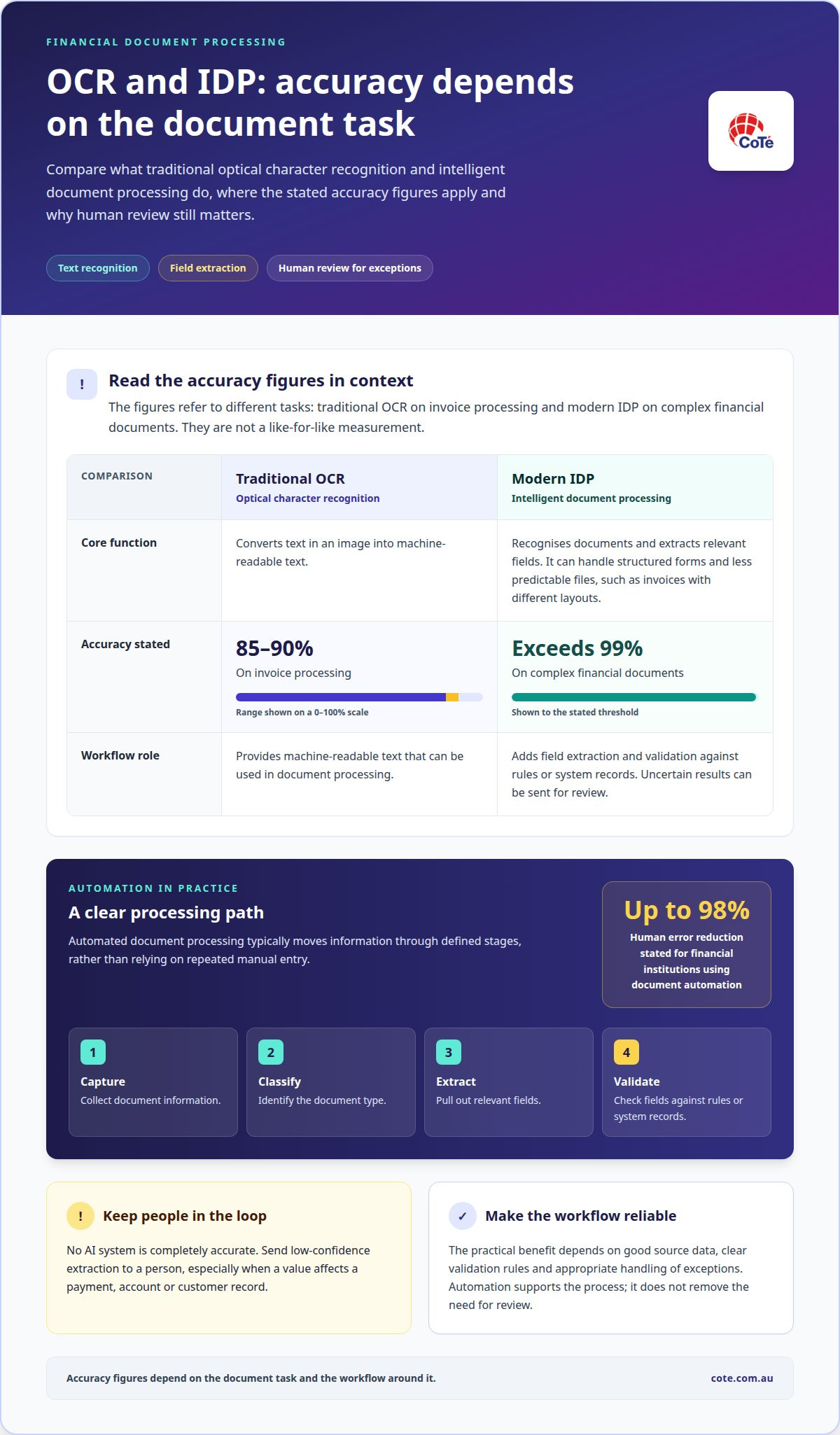
Financial document automation typically captures information, classifies the document, extracts relevant fields and validates them against rules or system records. It can process structured forms and less predictable files, such as invoices with different layouts. Robotic process automation (RPA) uses software bots for repeatable, rule-based tasks, such as transferring approved invoice details between systems. Intelligent document processing (IDP) adds document recognition and extraction, routing uncertain results for review.
Accuracy varies by document type and system, and no automated system is completely accurate. Low-confidence results should go to a person, especially when a value affects a payment, account or customer record.
Automated document generation for financial services: processing speed and error reduction
Automated processing moves routine information through defined steps without repeated typing. For example, a loan offer workflow can pull applicant details from the lending system, insert the approved wording for that product and send exceptions to an approver. The practical benefit depends on good source data, clear validation rules and appropriate handling of exceptions. Faster processing matters most when teams can act on reliable information rather than clear a queue of avoidable corrections.
Operational efficiency and staff reallocation
Financial institutions face pressure to process more work without letting routine administration crowd out analysis. Document automation can standardise repeatable tasks and give teams clearer visibility into how staff time is spent.
Efficiency and ROI measurement
Operational efficiency measures how well a team turns time and resources into completed work. It matters because automation should improve a defined workflow, not simply move delays elsewhere. To assess return on investment, compare a workflow’s baseline with its performance after implementation, including processing time, rework, exception volumes and operating effort.
Choose measures that reflect the work. A finance team could, for example, track how long account reconciliations take, how often records need correction and how many cases require manual escalation. Compare results across the same workflow and document types. If a new template speeds up document creation but increases approval delays, the end-to-end process hasn’t improved.
Benefits for financial operations teams
Automation handles predictable steps, while staff focus on exceptions, analysis and decisions. This matters when experienced employees spend time transferring information between systems instead of resolving complex cases. A standard template for recurring reports, for example, gives teams a consistent starting point. Staff can then review unusual entries and investigate discrepancies rather than rebuilding each document from scratch.
Reallocating work needs a clear plan. Identify which tasks the workflow removes, which still require human judgement and how responsibilities will change. Train staff to adjust workflow rules and manage exceptions. This makes operational change part of implementation, not an afterthought, and helps teams retain process knowledge as routine work is automated.
Measure outcomes beyond speed. Track whether service teams resolve requests with fewer hand-offs and whether finance staff spend more time on analysis. Pair workflow data with staff feedback to identify friction that system metrics may miss. These measures help leaders decide where automation supports the work and where a process still needs redesign.
Automating onboarding, lending and wealth management documents
Document automation applies approved data and workflow rules to recurring finance documents. In onboarding, lending and wealth management, it connects information with the documents staff and customers need.
AI in financial document management
Artificial intelligence (AI) can help identify and interpret information across financial documents. In a know-your-customer (KYC) workflow, it may process identity documents, verification forms and compliance packs. Staff still need to review exceptions and make decisions that require judgement. For example, a mismatch between an application and an identity document should be routed for review, not carried unnoticed into later records.
For lending, a workflow can assemble application data into loan documents, then route them for review and approval. The source of each field matters. Income, address and requested loan details should map to the relevant system record, so staff don’t have to re-enter values across forms. An exception path keeps incomplete applications visible instead of allowing them to proceed as complete.
Wealth management involves recurring reports, investment summaries and client communications. Document rules can draw approved information into a consistent report format and route it for review before delivery. A portfolio report, for instance, should use the organisation’s selected reporting period and source records. Review helps catch a missing figure or changed client detail before the document reaches its recipient.
Tax and investment documents also depend on correct inputs and current templates. Automation can populate recurring fields, organise documents by workflow and route drafts for review. It doesn’t replace professional assessment of tax treatment or investment decisions. Instead, it reduces repeated assembly work and makes document handling more consistent.
Platform features, integrations and compliance
Compare financial document platforms by how their features fit the workflow, not by the length of a feature list. Assess document capture, templates, validation, approvals, access controls and audit trails. Then consider how each platform supports governance and review. These capabilities can support compliance processes, but software alone does not make an organisation compliant.
Integration connects document workflows with systems that hold relevant information. Financial automation platforms can connect with banking systems, loan origination systems, enterprise resource planning (ERP) systems and customer relationship management (CRM) systems. An onboarding workflow, for example, can draw customer details from a CRM, create a document and route it for approval. Field mapping, validation and exception handling help manage mismatches between records.
Automated generation of financial statements and customer communications
Statements and customer communications contain figures and wording that must match approved records. Automation connects those records to document content and applies checks before delivery.
For a bank statement, a workflow can assemble account details, balances and transactions from the relevant system of record, the authoritative source for that information. A mismatch between a customer identifier and account record should stop the document from progressing. Validation rules can flag missing fields, unexpected formats or values that fail a defined check.
Generation is only one part of the process. Financial organisations also need to control what each document says and which version is used. A template can contain approved wording and defined data fields, while content rules determine which sections apply. For example, a customer notice about an account change should draw from the relevant account record and use the correct approved explanation.
Volume makes repetitive communication difficult to manage by hand. Regular statements, transaction notices and service updates all need accurate customer details and suitable wording. Automated workflows apply the same documented rules across these communications. They can also route exceptions, such as a missing address or conflicting account detail, for staff review before delivery. This keeps uncertain records out of routine production.
Customer communications need checks on both data and presentation. A validation step can confirm required fields are populated and figures match the source record. A review step can assess wording, formatting and recipient details. For example, a generated statement might pass a data check but still need review if its layout obscures an important transaction description. Clear ownership of these checks helps teams understand who is responsible.
Delivery should follow the organisation’s chosen channels and communication rules. Email, secure file delivery and printed correspondence each have different handling needs. A document workflow should preserve a clear link between the source data, the generated version and the intended recipient. This helps operations teams trace a customer query to the relevant statement or notice, rather than recreating the document without knowing which inputs were used.
CoTé: Virsaic Enterprise
Virsaic Enterprise is CoTé’s enterprise Customer Experience Management platform, supporting document composition, workflow approvals, signatures and multi-channel delivery. It gives finance teams a controlled way to prepare, review and deliver documents when onboarding packs, loan documents and customer communications move between teams.
CoTé’s software is Australian-built and hosted on Microsoft Azure in Australia and the United States. CoTé is ISO/IEC 27001 certified and has a SOC 2 Type II report.
Set the next workflow in motion
Make the next step a decision about scope. Choose a document workflow with clear inputs, reviewers and intended outcomes. Then define what should remain under human judgement and how the organisation will assess the workflow in use. This gives finance, operations and technology teams a shared basis for planning, instead of treating automation as a software task alone.
A considered approach to automated document generation in financial services starts with operational alignment. Map the process to how staff work, agree on ownership and set a practical review point. This creates a clearer foundation for deciding what to automate next and keeping governance connected to day-to-day delivery.
Ready to reduce manual data entry in your finance documents? Request a Virsaic Enterprise platform demo.
Frequently Asked Questions
What is automated document generation in financial services?
It uses data, templates and workflow rules to prepare financial documents with less manual assembly. For example, a lending team could populate an application summary from approved customer records, then route it for review. Automated document generation in financial services is most useful for repeatable documents with defined inputs and approval steps. Staff still need to handle exceptions and decisions requiring professional judgement.
What document generation software is available for Australian financial institutions?
Australian financial institutions can use enterprise platforms that bring document composition and workflow management into one process. CoTé offers Virsaic Enterprise for organisations managing document-heavy customer operations. The right fit depends on the documents involved, existing systems, review requirements and delivery channels. A useful evaluation starts with a defined workflow, such as producing and approving a particular customer notice, rather than a broad feature checklist.
What Australian laws and regulations apply to automated financial document generation?
Applicable laws and regulatory obligations depend on the institution, information and purpose of each workflow. Financial organisations should identify relevant privacy, financial-services, information-security and recordkeeping requirements with their compliance and legal teams. Then translate approved requirements into document rules, access permissions, retention practices and review steps. Automation can apply those controls consistently, but it doesn’t determine which obligations apply or replace the organisation’s compliance responsibilities.
How do automated document generation tools support privacy, security and recordkeeping requirements in Australia?
Tools support these requirements through controlled access, review workflows, document histories and defined handling rules. For example, an organisation can restrict a sensitive customer notice to staff who prepare or approve it, then retain the final version with its related records. Set retention and deletion processes according to approved internal schedules. Review access and workflow logs regularly so the organisation can trace document handling when questions arise.
What are the benefits and limitations of automated document generation for banks, insurers and wealth managers?
Automation helps banks, insurers and wealth managers produce routine documents consistently and reduce repetitive preparation work. A clearly designed workflow also makes exceptions easier to route. Its limits matter: incorrect source data, weak templates or unsuitable rules can carry errors into generated documents. Staff should review exceptions and content requiring judgement. Start with a repeatable process, then assess document quality and workflow performance.
Disclaimer
This article provides general information only and does not constitute legal, compliance or professional advice. Consider your organisation’s specific obligations and seek appropriate advice before making decisions.