
More channels won’t fix fragmented communication. A customer communications platform in Australia brings messages and documents together across channels, connects them with business systems and supports controlled workflows. The right fit depends on how your organisation creates, approves, sends and records communications.
For insurers, financial services firms, health providers and utilities, the pressure is practical: customers expect clear communication, while teams need reliable processes and control over sensitive information. Adding another channel without improving the work behind it creates more places for messages to get lost.
This comparison explains how platforms connect email, SMS and other channels with systems that hold customer and account information. It covers what to assess in integrations, workflow approvals and governance, and how communication needs vary across Australian industries. First, understand what the platform must do, then assess the technology.
Key Takeaways
- Map the channels customers use to the workflows that create, approve and record each message.
- Separate customer communication management from channel delivery: sending content faster doesn’t make the content clearer.
- Assess integrations by how well they pass customer, account and workflow data between systems.
- Compare platform costs by scope, message volumes, integrations and the channels your organisation needs.
- Virsaic Enterprise supports document composition, workflow approvals, signatures and multi-channel delivery.
Unified customer conversations across messaging, email, phone and social channels
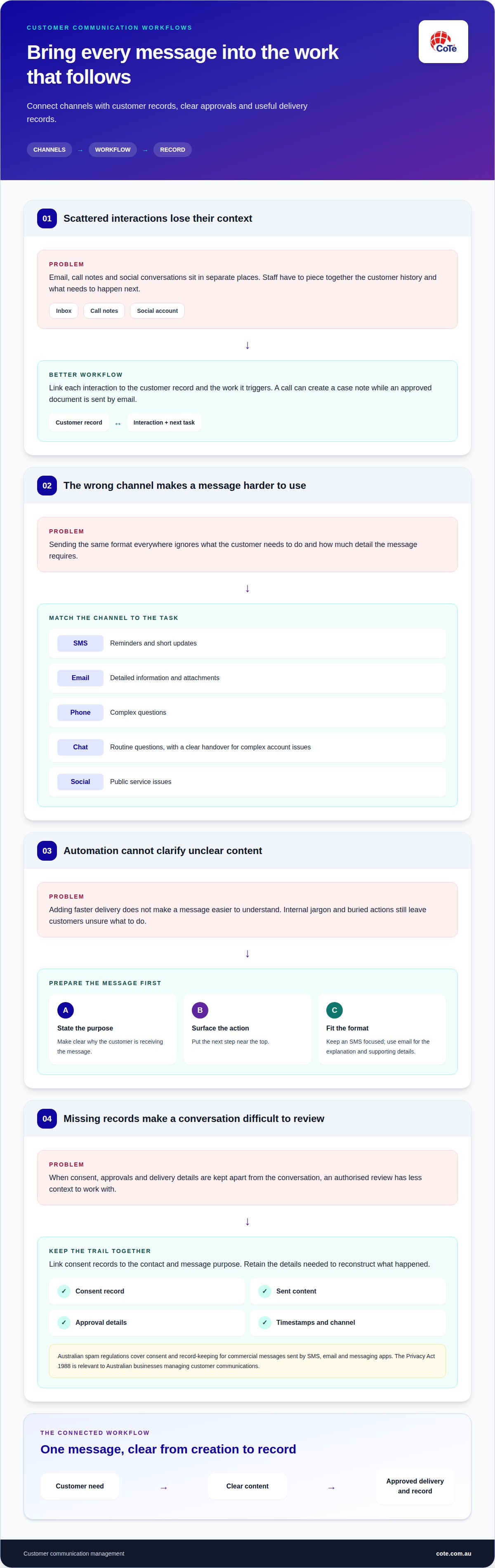
A customer communications platform connects customer contact across channels in a coordinated workflow. An insurance member might receive a policy letter by email, ask a follow-up question through messaging and call to update their details. Staff need the relevant history, not fragments scattered across inboxes, call notes and social accounts. A unified view links each interaction to the customer record and the work that follows.
Connected doesn’t always mean every channel sits in one screen. It means information moves between the systems that manage messages and customer records. For example, a phone conversation can produce a case note, while an email carries the approved document. A document and channel delivery workflow should preserve the relationship between the content, approval and delivery event.
Australian customers use different channels for different tasks. SMS and messaging apps suit reminders or short updates. Email works well for detailed information and attachments. Phone conversations help staff handle complex questions, while social channels can surface public service issues. The right channel depends on the message, customer context and action required. A chatbot can answer routine questions, but it needs a clear handover process for complex account issues.
Redesign the message before automating delivery. Start with a letter, email, SMS or chat response. Identify its purpose, the action the customer must take and any supporting details. Remove internal jargon, put the next step near the top and adapt the format to the channel. For example, an SMS can link to a secure document while an email explains what it covers.
- Letters: organise key details and actions for scanning.
- Email: use a clear subject and a direct opening.
- SMS: keep the update focused on one action.
- Chat: make responses easy to follow and hand over.
Consent, archiving and audit trails need to travel with the conversation. The Spam Act 2003 governs consent for commercial messages sent by SMS, email and messaging apps. The Privacy Act 1988 and the Australian Privacy Principles also apply to how many businesses collect, use and store customer information. Keep consent records linked to the contact and message purpose. Retain sent content, approvals, timestamps and channel details so an authorised review can reconstruct what happened.
Complex information may need more than another block of text. A short explainer video can walk a customer through a claim step, policy change or utility process. Pair it with a written summary and a clear next action. Keep the approved wording consistent across the video, letter and follow-up message. This gives customers more than one way to understand the same instruction without changing the facts from channel to channel.
Customer communication management definition and purpose
Customer communication management coordinates how an organisation creates, approves, sends and retains customer-facing content. Its purpose is to make each interaction accurate, consistent and connected to the work it supports.
Customer communication management and CRM
A customer relationship management system, or CRM, organises customer records, activity and business relationships. Customer communication management focuses on the documents and messages used during those relationships. For example, a CRM might record a member’s claim status, while communication software prepares an update and manages its approval. Check that each system has a distinct role rather than duplicating records and controls.
The distinction matters when a campaign, service update or meeting follow-up triggers several actions. A CRM can identify a customer group or record an interaction. Communication management handles message content, review steps and delivery. Connected workflows pass relevant data between systems and reduce manual copying. Set clear ownership: decide where contact details live, where message templates are controlled and where delivery records are stored.
Customer communication management software does more than send messages. It can organise reusable content, apply approval steps and coordinate delivery through selected channels. Automation performs defined actions when set conditions are met. For instance, an approved account notice can be prepared from customer data, routed for review and delivered through an authorised channel. Staff still govern the content, permissions and exceptions.
Platforms vary in scope. Some focus on document composition and outbound delivery. Others add campaign management, inbound interaction handling or mobile access for staff. Compare functions against a real workflow, such as a policy renewal or health appointment update. Trace the content from source data through approval and delivery to record retention. A feature list matters less than whether the platform supports the entire process.
Phone and call management
Business phone features focus on handling voice interactions and connecting them with customer work. Assess whether staff can associate call records and notes with the relevant customer or case. Check how the system handles call queues, transfers and follow-up actions. These details show whether a phone interaction becomes part of an accountable service process or remains isolated in a separate log.
Also consider mobile access for authorised staff and how voice records relate to other communication history. A call about a billing issue should lead to a traceable action, such as a case update or written follow-up. Document how call details are captured and assigned so the service team can apply the process consistently.
Integrations with commerce, field-service and other platforms
Choose a platform by mapping the customer workflows, channels and systems it needs to connect. Implement one defined workflow first, test data movement and approvals, then extend the integration to other processes.
An integration connects separate software systems so they can exchange information. For an online order, a commerce system might hold purchase and delivery details, while a communications platform uses approved data to prepare an order update. Define which system owns each field, such as the delivery address or order status. This prevents conflicting records and ties updates to the right transaction.
Field-service operations need a different connection. A utilities appointment links a customer record, a work order and a technician visit. A status change should trigger the right customer update, while a rescheduled visit should not leave an outdated message in place. During selection, map the event, data fields, message and approval owner. Test normal outcomes and exceptions, including cancelled appointments.
Financial services teams should design integrations around controlled access and retrievable records. A platform connected to a policy administration or account system needs clear data permissions. Staff should be able to trace which information populated a notice and which approval released it. Align the workflow with the organisation’s governance and retention processes. A connection that passes data without preserving its context creates avoidable review work.
Help desk and customer service software manage cases, queries and service actions. Connecting these tools to communications workflows lets a case update inform a customer response. For example, a billing enquiry can create a service ticket, assign an owner and trigger an approved acknowledgement. Define how replies return to the case record. Otherwise, the customer receives a message while the service team lacks a complete interaction history.
AI customer service adds another integration decision. A chatbot might use help content to answer a routine question, then pass a complex issue to a staff member. Set boundaries for the information it can use and the actions it can take. Keep human review for sensitive or consequential messages. Track when automation handles an interaction and when a person takes over.
Test the actual traffic between systems during vendor selection, not just a polished demonstration. Use a sample workflow to check field mapping, duplicate handling, failed updates and access permissions. Confirm how integration changes are documented and how testing is supported when source systems change. A phased implementation gives teams a controlled way to resolve data and process faults before wider rollout.
Cost of customer communication platforms in Australia
There’s no single Australian price for a customer communications platform. Pricing depends on scope, volumes and integrations. Request a quote based on a defined workflow, such as preparing, approving and sending a policy renewal notice by email and post. This gives the provider a practical basis for estimating platform, setup and ongoing operating costs.
Start with the pricing model. A subscription might be based on users, modules or organisational needs. Usage-based charges can relate to message volumes or specific channels. An enterprise agreement might cover a broader deployment. These models aren’t directly comparable unless you use the same workflow, expected traffic and service requirements for each estimate.
Volumes matter because routine account updates differ from occasional, high-volume campaigns. Estimate the customer records, messages and document types in scope. Separate regular communications, such as statements, from event-driven messages, such as appointment changes. A clear volume profile helps distinguish fixed platform costs from charges that rise with use.
Integration work affects total cost. A platform connected to a customer database, claims system and service desk needs more design and testing than a standalone email workflow. Identify the systems, data fields and triggers involved. For a claims update, the estimate should account for how claim status reaches the message process and how delivery records return to the right customer account.
Implementation costs also depend on existing processes. Moving approved templates differs from redesigning letters, emails and SMS content. Legacy data, approval rules and historical communication records can add migration work. Ask for a scope that separates configuration, integration, content work, migration and training. This breakdown makes it easier to see what the estimate includes.
Compare proposals against one shared scenario, not headline subscription amounts. A useful scenario might cover a monthly statement, an approval step, email delivery and a retained record. Ask each provider to show which elements are included and which depend on usage or extra configuration. This reveals differences in scope without relying on an industry average that may not match your operation.
Which platforms support Australian SMS, email, WhatsApp and voice channels?
Channel support depends on the platform’s design and connected services. Some platforms manage email and SMS directly; others connect to separate messaging, email or phone systems. Compare the actual workflow, not a list of channel logos. For an Australian insurer, a renewal email, an SMS reminder and a phone enquiry all need consistent customer and policy details.
For SMS, assess how the platform prepares messages, selects recipients and records delivery events. A payment reminder needs a clear purpose and the correct account reference. Confirm how the chosen setup records consent, message content and delivery information across connected systems.
Email remains useful for detailed notices, attachments and messages customers need to retain. Test whether staff can select an approved template, populate the right customer data and route content for review. For a health appointment update, the email should distinguish the date, location and action required. Its delivery record should remain linked to the right customer or service record.
WhatsApp support needs clear definition. Establish whether the platform connects through a supported messaging service, and identify where conversations and customer permissions are managed. A platform that handles outbound notifications might not provide a shared inbox for replies. Test a complete interaction, including a customer response, staff handover and retained conversation history. This reveals the channel’s practical capabilities.
Voice is often managed differently from text channels. A business phone system may handle calls, while customer communication software links call details to a case or account. For a utility fault report, staff need the caller’s issue and follow-up action recorded together. Assess whether the connection captures notes and routes work to the right team. Don’t assume voice is included just because a platform lists multi-channel support.
Compare channel coverage using one customer journey. A financial services notice could begin as an email, prompt an SMS follow-up and lead to a phone conversation. Map which system owns the customer record, how staff respond and where interaction history is stored. Include failure cases, such as an undelivered email or unanswered call. This exposes gaps hidden by separate channel demonstrations.
Then match channel use to message purpose. Use email for detail, SMS for concise prompts, WhatsApp for supported messaging interactions and voice for conversations requiring staff attention. Keep content and records governed across the journey.
To discuss how these channels fit a document-led communication workflow, talk to CoTé.
CoTé: Virsaic Enterprise
Virsaic Enterprise is CoTé’s enterprise Customer Experience Management platform, supporting document composition, workflow approvals, signatures and multi-channel delivery. Consider it when customer communications need approved content, controlled workflows and delivery records across several channels. Where email and SMS campaigns form part of the workflow, Pulse supports those communications.
CoTé’s software is Australian-built and hosted on Microsoft Azure in Australia and the United States. CoTé is ISO/IEC 27001 certified and has a SOC 2 Type II report.
Turn platform selection into a working plan
Define the workflow your organisation needs to improve. Choose a real customer communication, identify its source data and approval path, then set out how staff will deliver and record it. This gives your evaluation a practical test rather than a list of features.
Ready to test your first communication workflow? Request a Virsaic Enterprise platform demo.
Frequently Asked Questions
What is a customer communications platform?
A customer communications platform helps an organisation manage customer messages and related tasks across channels. For example, a financial services team could use one workflow to prepare an account notice, route it for approval and record the final version. The platform controls how communication work moves through the organisation, rather than simply providing another inbox for staff.
Which customer communications platforms are available in Australia?
Australian organisations can choose platforms focused on document composition, campaign delivery, contact centre interactions or broader communication workflows. Some products specialise in one channel; others coordinate several processes. The right shortlist depends on the organisation’s work, customer channels and existing systems. For a document-heavy operation, prioritise tools that manage content and approvals alongside delivery instead of comparing platforms by channel count alone.
What are the best customer communications platforms for Australian businesses?
The best fit supports the organisation’s priority workflow and governance needs. An insurer handling policy changes has different requirements from a health provider sending appointment information. Define the audience, content owner, approval path and recordkeeping needs first. Then test the platform against a real scenario, including exceptions such as incorrect customer data or a message that needs to be withdrawn.
How do Australian customer communications platforms compare on features and integrations?
Compare platforms on content control, user permissions, approvals, delivery records and connections to existing systems. Ask how a corrected customer address moves from the source system into a queued message. Test what happens when a connection fails or data arrives twice. These checks reveal operational differences that a feature list or demonstration can miss.
Do platforms comply with the Australian Privacy Act and APPs, and what privacy risks should organisations consider?
Using a platform does not, by itself, establish that an organisation meets its privacy obligations. Assess its configuration and operating processes against the Privacy Act 1988 and applicable Australian Privacy Principles. Review access controls, data locations, retention, exports and incident handling. These details help identify where personal information is stored and who can access it.
Disclaimer
This article provides general information only and does not constitute legal, compliance or professional advice. Consider your organisation’s specific obligations and seek appropriate advice before making decisions.