

Clients expect to check their finances and documents online, and advisers need to keep that access secure. A secure client portal for financial advisers in Australia should make it straightforward for clients to view financial information, review transaction histories and access documents, while protecting sign-in with multi-factor authentication.
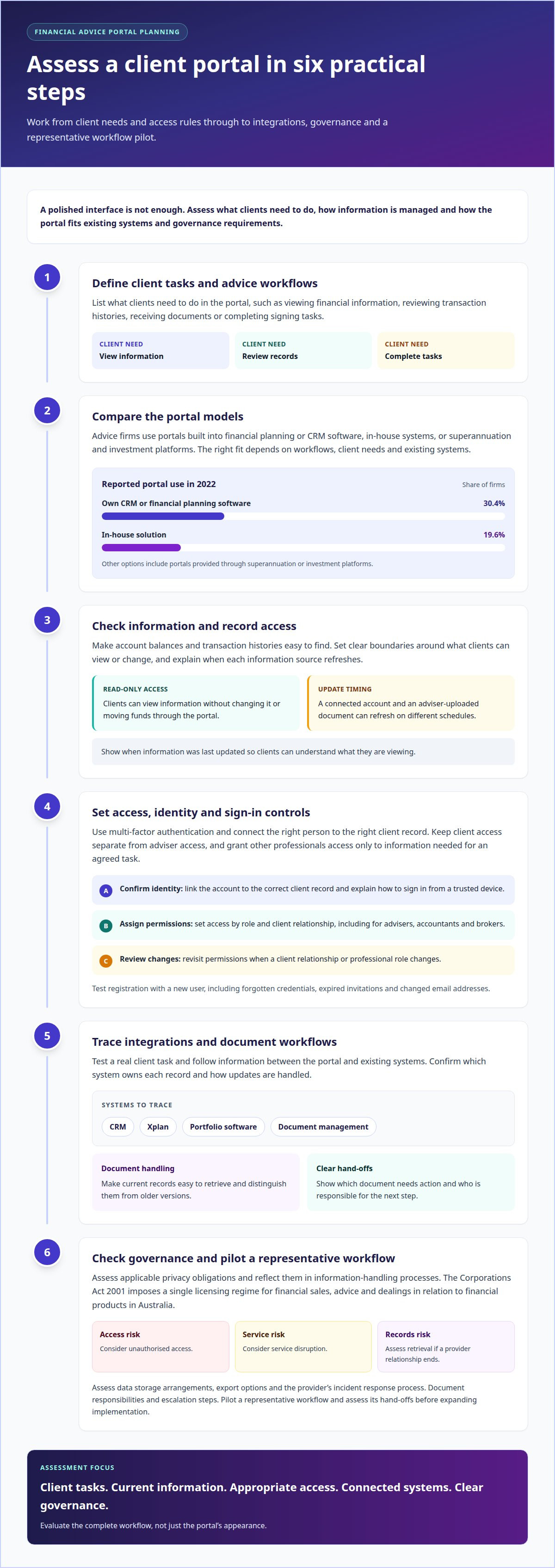
Advice firms typically consider portals built into financial planning or CRM software, developed in-house, or provided through a superannuation or investment platform. The right format depends on how the portal fits existing workflows and what clients need to do there. A polished interface won’t fix missing information or cumbersome processes.
This guide explains the features worth prioritising, including timely financial information, account balances, transaction histories, multi-factor authentication and custom branding. It also covers how to assess the portal’s fit with your organisation’s systems, governance needs and client experience. The aim is practical: understand what a client portal should do before deciding how it should look.
Key Takeaways
- Choose a portal model that fits your advice workflows, client needs and existing systems.
- Assess how clients access financial information and whether the information is current enough for its intended use.
- Make account balances and transaction histories easy to find, with clear boundaries around what clients can view or change.
- Prioritise multi-factor authentication and customisation that helps clients recognise and use the portal.
- CoTé’s Virsaic Enterprise supports document composition, workflow approvals, signatures and multi-channel delivery, and Share supports secure file sharing.
What to look for in a secure client portal for financial advisers
Australian advice firms use portals built into planning or CRM software, in-house systems, and superannuation or investment platforms.
Secure document sharing and signing
Assess how clients receive documents, complete signing tasks and access finished records. Check that the process shows which document needs action and who is responsible for the next step. For example, test a client review and signing workflow from issue through to filing. Clear hand-offs matter more than adding extra steps or features.
Financial document storage
Storage should make it easy to retrieve current records and distinguish them from older versions. For tax time, organise relevant statements and advice records so clients can locate and share the right files. Define how staff name documents, manage outdated copies and retain records. These rules reduce confusion when clients or advisers need a specific file.
Security, usability and system integrations
Compare access controls, ease of use and connections with existing systems. Test a real client task, then trace information between the portal, CRM, Xplan, portfolio software and document management tools. Confirm which system owns each record and how updates are handled. This exposes manual work and mismatched information before implementation.
Financial advice in Australia is regulated under the Corporations Act 2001. Organisations should also assess applicable privacy obligations and reflect them in their information-handling processes.
Start by defining client tasks, required integrations and governance needs. Pilot a representative workflow and assess its hand-offs before expanding implementation. Portal costs depend on scope, volumes and integrations, so request a quote based on a clearly defined workflow.
Risks include unauthorised access, service disruption and difficulty retrieving records if a provider relationship ends. Assess data storage arrangements, export options and the provider’s incident response process. Document responsibilities and escalation steps before launch.
Real-time client access to financial information
Online access gives clients a central place to view financial information on a desktop or mobile device. Its value depends on how current the information is and who can see it.
Access for advisers and other professionals
Advisers, accountants and brokers need access to information relevant to their work, not unrestricted visibility across every client record. Set access by role and client relationship, then test a practical task, such as an accountant viewing a client’s tax documents. Clear permissions help prevent unnecessary sharing of personal information and make access easier to manage when a professional’s role changes.
Read-only financial information
Read-only access lets a client view information without changing it or moving funds through the portal. That boundary suits account summaries, investment details and records intended for review. Explain what information clients can see and when it refreshes. A portal is only as current as its connected source, so distinguish live updates from information refreshed on a schedule.
Secure access and portal registration
Registration should connect the right person to the right client record. A sound process confirms identity, links the account and explains how to sign in from a trusted device. Keep instructions direct, with a clear route for forgotten credentials or changed personal information. Test the process with a new user before launch, including what happens when an invitation expires or an email address changes.
Clarify what “real time” means for each type of information. A balance drawn from a connected account can update on a different schedule from a document uploaded by an adviser. Showing when information was last updated helps clients understand what they are seeing. For example, a client checking an investment summary before a meeting needs to know whether it reflects the latest available data.
Registration also sets expectations. Explain which accounts appear, how clients receive access and what to do if their personal information changes. A short, tested onboarding sequence reduces avoidable support requests and helps clients use the portal from their preferred device. Keep instructions consistent across email and the sign-in screen.
Account balances and transaction histories
Balances and transaction histories help clients understand the movement behind a portfolio’s current value. That functionality is useful when a client wants to review investments, check a transaction or prepare for an adviser meeting. The portal should make the relevant account and period easy to identify.
A balance is a snapshot; a transaction history shows activity over time. Present both with clear labels, dates and account names. For example, a client reviewing a savings account should be able to distinguish the available balance from a recent deposit or withdrawal. Include a visible update time so clients know when the information was last refreshed.
Linked financial accounts can bring information from different sources into one view. Where a portal uses linked account data, explain which accounts are connected and how the client manages that connection. Account coverage and update timing affect how complete the view is, so avoid presenting a partial record as a full picture of someone’s finances.
Once registered, clients need a practical way to resolve questions about a balance or transaction. Provide a route to contact their adviser or accountant, and explain what information helps clarify the query, such as the account name, transaction date and description. For a transaction requiring context, the adviser can discuss its purpose without giving the client unnecessary access to unrelated records.
Finally, define what each balance represents. A cash account balance, an investment valuation and a transaction total describe different things. Give each figure a label and relevant date, then use a sample client journey to check the presentation. Clear information helps clients follow changes, discuss saving decisions and bring specific questions to their next adviser conversation.
Multi-factor authentication
Multi-factor authentication (MFA) asks users to prove their identity using more than one factor. A portal might combine a password with a temporary code sent to a registered device. If someone obtains the password, that second step creates another barrier before they can reach stored wealth information, statements or personal details.
Two-factor authentication (2FA) is a specific form of MFA that uses two separate checks. The checks should rely on different types of evidence, such as something the user knows and something they possess. Entering a password twice does not provide two independent factors. This distinction helps advisers assess whether a portal’s login process adds another genuine check.
Sign-in, recovery and staff access
Map the sign-in journey from invitation to account access. A client enters their password, completes the second check and reaches the portal only after both steps succeed. Consider what happens when they replace a phone, lose access to an email account or travel without their usual device. Recovery should verify identity without creating an easy way around the second factor.
Keep the process usable. A client reviewing a wealth statement on a mobile device should understand where the code arrives and how long it remains usable. Clear prompts reduce confusion, while a sensible recovery path helps prevent account lockouts from becoming routine support issues. Test the process with clients using different devices and levels of technical confidence.
Apply MFA consistently to adviser and administrator accounts as well as client logins. Staff access can expose information across multiple client records, so the portal’s controls should reflect each person’s role. Review how the system handles new devices, password changes and repeated failed attempts. Document who can reset access and how that action is recorded.
Security also depends on what happens after sign-in. Set appropriate session controls for shared or unattended devices, and make sign-out easy to find. For example, a client using a family computer should be able to end the session before leaving. Explain these steps during registration, then reinforce them in the portal’s sign-in guidance.
Assess MFA as part of the overall access design, not as a checkbox. Record which user groups must use it, which second-factor methods are available and how recovery is controlled. Test ordinary and failure scenarios before rollout. A practical review gives the firm a clearer view of access risks and helps clients use the portal with confidence.
Portal branding and customisation
Branding shapes how clients recognise and use an advice portal. Customisation should make the platform feel connected to your organisation without hiding key tasks behind decorative design. Start with practical elements: logo placement, colour contrast, navigation labels and the wording clients see when they sign in.
Keep the visual system consistent with existing client communications. For example, use the same organisation name and logo on the portal, advice reports and email invitations. That continuity helps clients identify the service they intended to access. It also reduces confusion when clients receive documents through several channels.
Prioritise the first tasks clients need to complete. Put familiar actions, such as viewing reports or finding documents, in clear navigation. Use plain labels rather than internal team names or technical terms. A client looking for an investment report shouldn’t have to guess whether it sits under “resources”, “library” or another menu.
Customisation also includes the content around each task. Write concise instructions for common steps, such as opening a report or updating personal details. Use a sample client journey to test the wording on desktop and mobile devices. If a client needs staff help to understand the next step, revise the screen before rollout.
Set design rules before teams begin adding content. Define approved logo files, colour use, headings and document naming. For example, reports should display a clear title and date, while portal messages should use the same organisation name as the sign-in page. A simple set of rules keeps updates coherent across teams and reduces inconsistent presentation.
Customisation has limits. Visual changes should not weaken readability or make security instructions hard to find. Check colour contrast, text size and button labels, then test sign-in and document-viewing journeys with users. The best design is not the most elaborate one. It is the one that helps clients complete familiar tasks without friction.
CoTé: Share and Virsaic Enterprise
Virsaic Enterprise is CoTé’s enterprise Customer Experience Management platform, supporting document composition, workflow approvals, signatures and multi-channel delivery. It gives advice firms a controlled way to prepare, approve and deliver client documents alongside their chosen portal. Share supports secure file sharing with clients.
CoTé’s software is Australian-built and hosted on Microsoft Azure in Australia and the United States. CoTé is ISO/IEC 27001 certified and has a SOC 2 Type II report.
Ready to connect your client documents and portal workflows? Request a Virsaic Enterprise platform demo.
Frequently Asked Questions
How are advice firms using this technology?
Advice firms use portals to coordinate routine client service and make outstanding actions visible. For example, a team can assign responsibility for a client query, record its status and route exceptions for review. This helps managers identify stalled work without relying on scattered email updates. Define who owns each task and what event closes it, such as a resolved query or completed client instruction.
What features should a secure client portal for financial advisers in Australia include?
Alongside client-facing tools, include practical administration features. Staff need a controlled way to add or remove users, manage permissions when roles change and review activity. Look for clear status indicators, accessible screen layouts and reporting that helps teams spot unresolved tasks. Test these functions against a typical service scenario, such as a client changing advisers, to see whether the portal supports a smooth handover.
Which client portal platforms are designed for Australian financial advisers?
There is no single platform suited to every Australian advice business. Establish whether the portal is intended for client self-service, adviser-led communication or a defined set of operational tasks. Then assess how its support model, configuration and governance fit your organisation. A useful evaluation includes a trial using representative users and workflows, plus an exit plan for retrieving business records if the arrangement ends.
What cybersecurity standards and controls should an Australian adviser portal meet?
Set requirements through your organisation’s risk assessment and vendor governance process. Ask for evidence that controls are documented, reviewed and tested, and establish how responsibilities are divided between your organisation and the provider. Include staff access reviews, security incident escalation and continuity arrangements in the assessment. Record the evidence considered, outstanding risks and approval decision so governance teams can revisit them as the service changes.
How do client portals support secure document sharing, eSignatures and client onboarding in Australia?
They help teams manage hand-offs and exceptions around client documents. For example, onboarding can show whether required information has arrived, identify incomplete submissions and assign follow-up to an owner. For signing, define how staff handle a corrected document or a client who cannot complete the process. Clear exception paths prevent routine workflows from leaving clients uncertain about what happens next.
What Australian privacy laws apply to financial adviser client portals?
The Privacy Act 1988 regulates how Australian Government agencies and certain private sector organisations handle personal information. Firms should assess applicable privacy obligations and reflect them in their information-handling processes.
Disclaimer
This article provides general information only and does not constitute legal, compliance or professional advice. Consider your organisation's specific obligations and seek appropriate advice before making decisions.